Beta — free to connect
Workspace for teams, agencies and multi-location brands

A hundred accounts.
One working day.

Publish to every account in a single action, handle all messages and comments in one inbox, and give your team roles you can actually audit. Instagram, Facebook, Telegram, TikTok and Threads — in one console.

Official platform APIs only. We never ask for your passwords and never emulate the app — that is exactly what gets accounts banned.
5 networks
in one window
1 action
every account at once
01 / why

Do the math on your working day

Forty accounts and three minutes per post is two hours of manual work — every single day. And that is publishing alone: replies, comments and reports come on top. AntCore takes those hours back.

how it usually goes

Twenty tabs and one pair of hands

  • The same post is repeated by hand in every account — and one location always gets forgotten.
  • A customer message is noticed a day later, when replying is no longer possible.
  • Forty identical “how much?” comments under one post, each answered from scratch.
  • Account passwords live in a group chat, and “who did this?” is answered from memory.
  • Reporting per location is assembled by hand from a dozen analytics screens.
The more accounts you run, the faster the routine grows: it multiplies by their number, your working day does not.
with AntCore

One action instead of forty

  • A post goes to every selected account and every network at once, each with its own format and copy.
  • A week of content is scheduled in one morning: every account gets its own time and its own file.
  • Every incoming message in one window, with a reply timer on each conversation.
  • Identical comments collapse into one row — you answer once.
  • Each teammate has a role and their own accounts, and the log shows who did what.
No one needs your social passwords: access is granted inside AntCore and revoked at any moment.
02 / interface

The whole working day in one window

These are real AntCore screens — the same ones you get after signing in. The data on them is demo data: no real conversations or customers are shown.
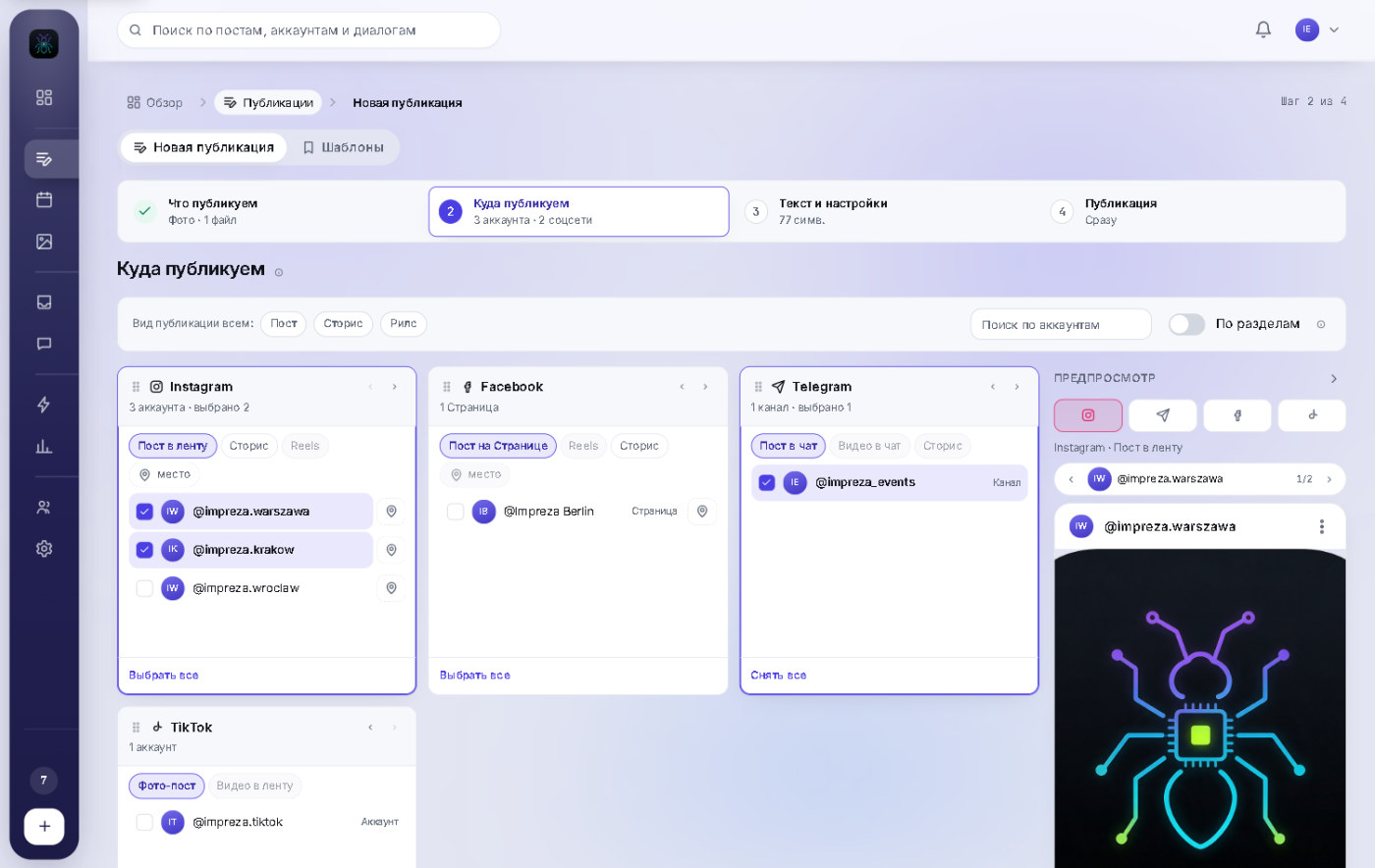
Publishing in AntCore: one post going to Instagram, Facebook, Telegram and TikTok, each with its own placement
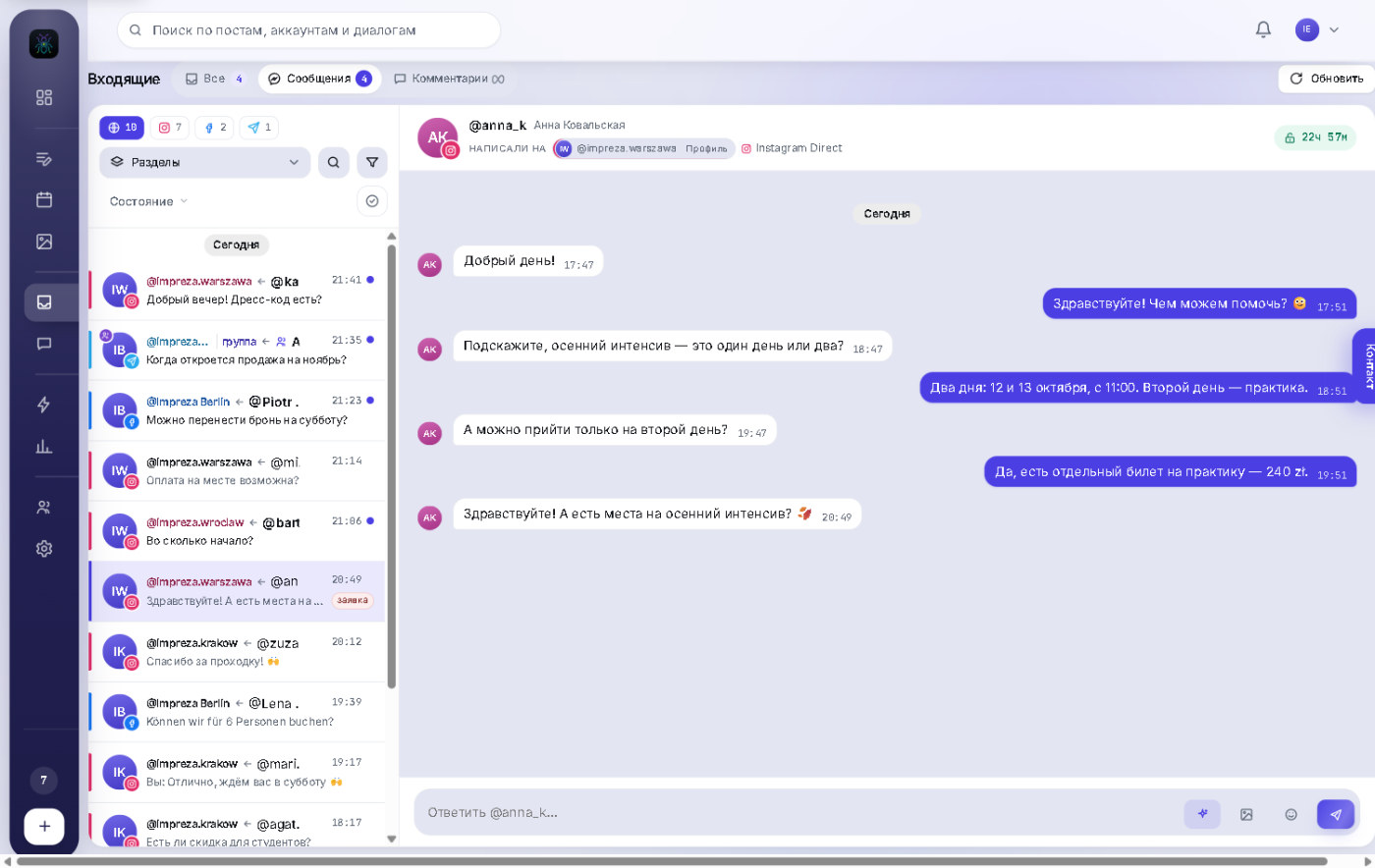
The inbox: messages from Instagram, Facebook and Telegram in one feed, with a reply-window timer
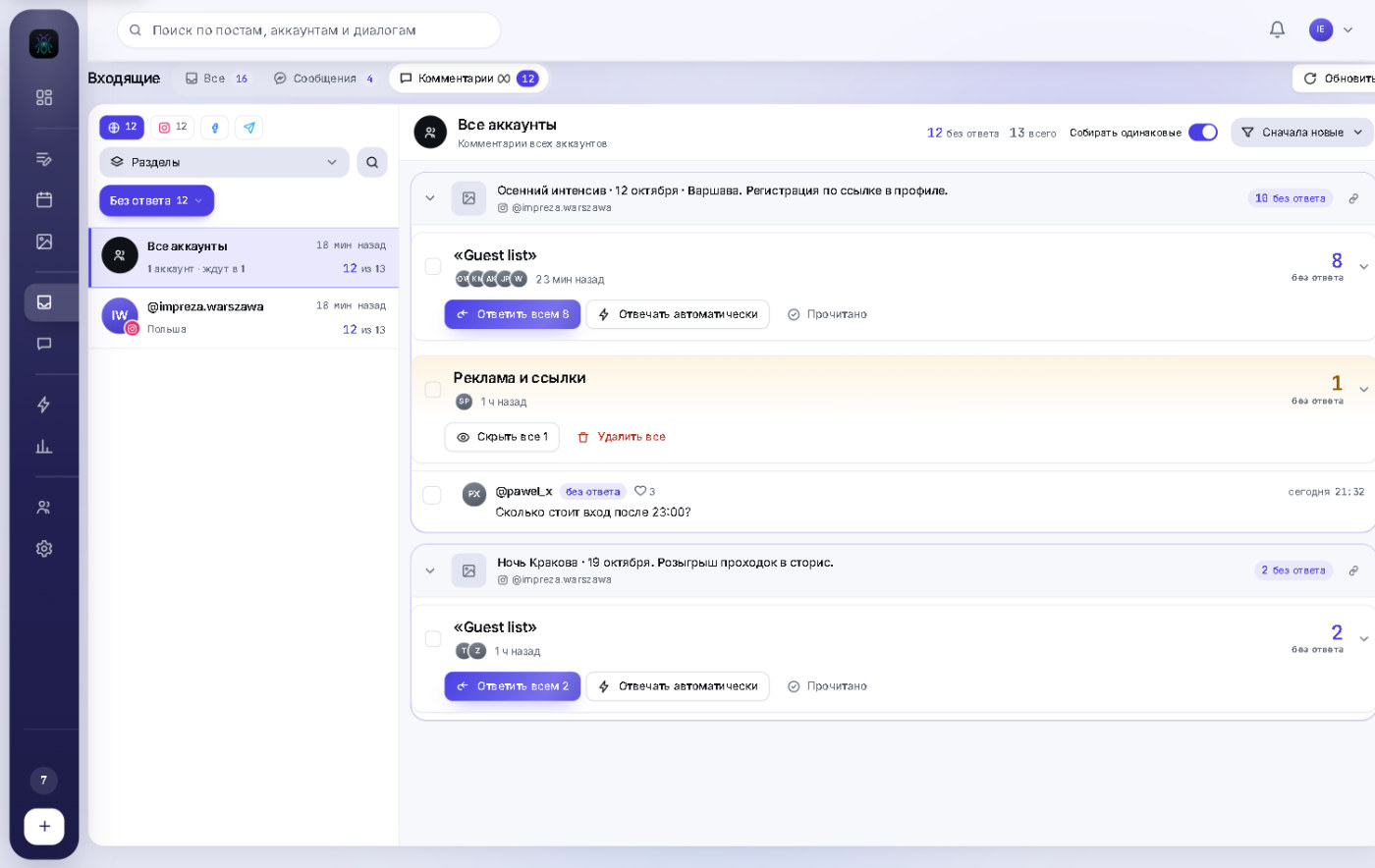
Comments queue: identical questions collapsed into one card with a “Reply to all” button
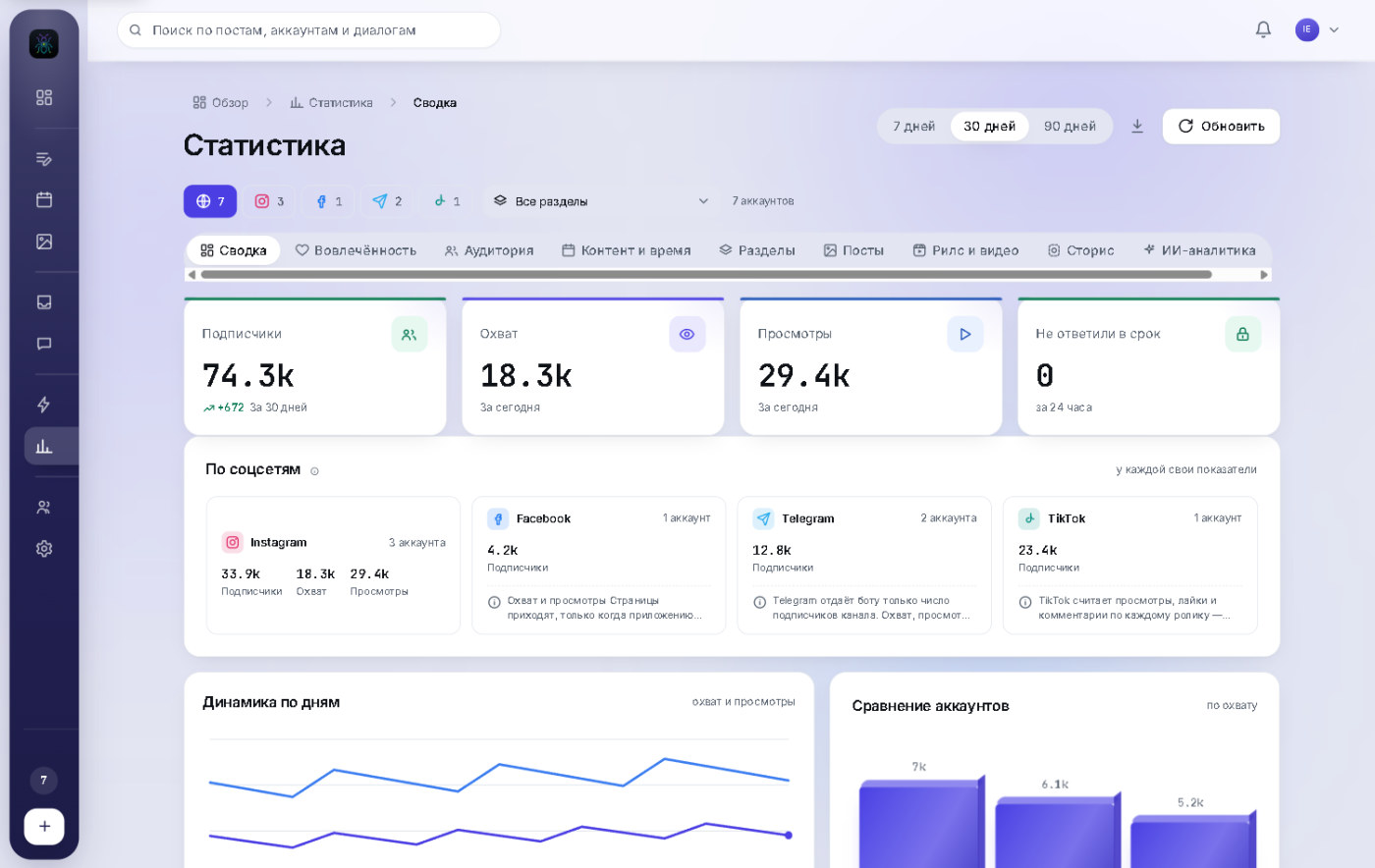
Analytics: followers, reach and views per network, daily dynamics and account comparison
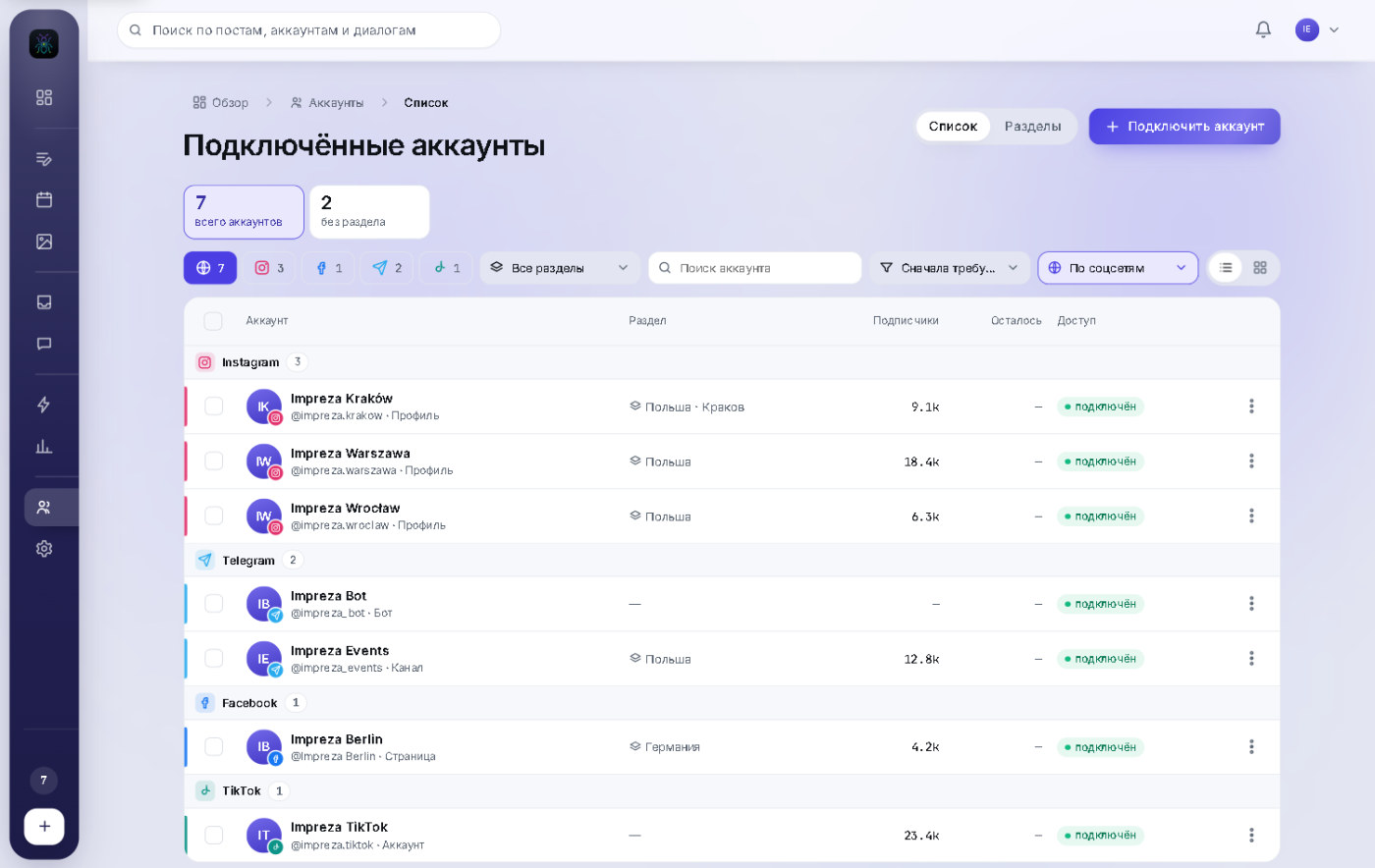
Accounts: connections grouped by network and section, with access status
AntCore screens · demo data
03 / features

What AntCore actually does

No vague claims: below is what works in the product right now, section by section.

3.1

Publishing

One composer for every network: what you post → where → the copy → send.

Cross-posting to five networks

A single post reaches Instagram, Facebook, Telegram, TikTok and Threads at once — each with its own placement.

  • Feed, Reels, stories, channel post, video
  • Separate copy per network, with that network's character limit
  • Links as words inside the text, not raw URLs

Preview and cropping

You see exactly what the reader will see — including how the platform crops the frame.

  • Drag and zoom the frame right inside the preview
  • The file is cropped before it is sent, not left to the platform
  • 9:16, 4:5, 1:1, 16:9 and other formats

Per-network options

Everything the official platform interface allows, on one step.

  • Reels cover, collaborators, people tags, “made with AI” label
  • Location: the account default or a custom one
  • Pin to a Telegram channel, TikTok visibility and paid-partnership disclosure
  • iPhone video is converted to a format the platform can actually play
3.2

Bulk scheduling

Dozens of files across dozens of accounts — with a natural rhythm instead of “everything identical at the same minute”.
the main difference

50 files across every account

Each file reaches each account exactly once, yet at any given moment different accounts publish different things.

  • Up to 50 files per run
  • Account and file order is shuffled
  • A plan preview before launch: how many posts and over how many days

Every account on its own clock

The schedule builds itself with jitter and gaps — the way a human would space posts out.

  • Interval, time jitter and a minimum gap
  • Active hours: night slots move to the morning
  • Daily platform limits are respected, the remainder rolls over to tomorrow

Varied copy without manual work

One caption template turns into different captions for different accounts.

  • Several captions in rotation
  • Inline wording options: {today|already today}
  • Placeholders: city, account, network
  • Reschedule or cancel the whole batch in one action
3.3

Calendar and history

See what is queued and what came out of it.

Calendar

Month, week or list — and a day that opens step by step.

  • Network → account → placement → the posts themselves
  • Drag a post to another date
  • Remaining daily limit right in the day header

History

Everything that was sent, with the outcome per account.

  • Published, queued or failed — with a plain-language reason
  • Retry in one click, including a whole batch
  • A link to the live post on the network

Templates and media library

Recurring posts are assembled in one click.

  • A template keeps accounts, placements, copy and options
  • Media library with folders, search and drag-and-drop
  • Upload a whole folder — the structure is kept
3.4

Inbox

Every message from every account and network in one feed.

One list for all networks

Instagram Direct, Facebook Messenger and Telegram — including private chats, groups and channel discussions.

  • Filters by network, account, section and tags
  • Search across conversations
  • Photos, video, video notes, voice messages, stickers and reactions

The 24-hour reply window

Instagram and Facebook allow replies for 24 hours — after that the conversation closes.

  • A timer on every conversation and an “expiring” folder
  • Folders: unread, read, answered, closed
  • A “missed the window” metric in analytics

Working a conversation

Everything an operator needs sits next to the thread.

  • Tags, an internal note, “I reply / the bot replies”
  • AI draft reply — a human always presses send
  • Keyboard shortcuts and adjustable column widths
3.5

Comments

A queue of its own, not a pile under every post.
saves hours

Identical ones become one card

Forty “Guest list” comments under a poster turn into a single row with a count.

  • Unique questions are listed apart so they do not drown in repeats
  • Promo and spam are grouped separately
  • Queue by account, as a feed, or grouped by post

Reply in bulk

One answer reaches everyone who asked — while looking different to each of them.

  • Several wordings in rotation
  • A pause between sends so the network does not read it as spam
  • Publicly and via DM — with two different texts

Moderation

Reply, hide, delete or mark as read — all at hand.

  • A one-by-one review mode with ready answers
  • Comments from Instagram, Facebook, Threads and Telegram discussions
  • Turn a comment into an auto-reply rule right from the card
3.6

Bots and auto-replies

They answer where you allowed it — and stay silent everywhere else.
safety

The bot is silent by default

A reply is sent only when everything lines up: the campaign is on, the account and channel are selected, and the chat is allowed.

  • Any uncertainty is read as “stay silent”
  • A “Stop all auto-replies” button is always visible
  • You can always see where the bot is answering right now

Campaigns: event → action

Configured as a scenario, not as a pile of checkboxes.

  • Eight events: message, comment, first contact, story reply, mention, reaction, referral link, button tap
  • Phrase matching: exact, contains, or typo-tolerant
  • Actions: reply publicly, send a DM, hide, delete, add a tag, call a human

AI replies and Telegram bot

AI answers in your own description of the business, and the bot can run a chat.

  • Working hours and an out-of-hours message
  • Join requests, welcome messages, subscriber-only replies, buttons, forms, ratings
  • Stop-words in groups and a hand-off signal to an operator
3.7

Analytics and AI review

Not “pretty charts”, but an answer to what to do next.

Metrics per network

Every network has its own numbers — and we say plainly which ones it does not provide at all.

  • Reach, views, engagement, followers
  • Audience: gender, age, countries, cities
  • Posts, Reels and stories in separate tables, CSV export

Content and timing

Which formats, hours and weekdays work for you specifically.

  • Adjusted for account size — otherwise the “best hour” is just when your largest account posts
  • Locations compared side by side, including reach per account
  • 7, 30 and 90-day periods

A full review in one click

AI reads your numbers and writes what to change — with figures and links to specific posts.

  • Up to eleven analyses: locations, formats, timing, captions, topics, audience, consistency
  • A headline conclusion, three priorities and a four-week plan
  • Runs on your own AI key — the cost is shown up front
3.8

Accounts

A hundred connections stay manageable.

Sections instead of a flat list

Accounts are grouped by country, city or client — two levels deep.

  • The section filter works in publishing, inbox and analytics alike
  • Bulk moving and search
  • Group the list by network or by section

Access does not silently expire

Connections renew themselves, and if something breaks you see it immediately.

  • A visible banner naming the accounts that need signing in again
  • Remaining daily limit per account
  • Disconnecting an account deletes its data

Account card

Everything about an account in one window.

  • What it supports, how many messages await a reply, what is queued
  • Default location and section
  • The auto-reply campaigns that apply to it
04 / who it is for

Who benefits most

AntCore is built for people with more accounts than hands. The more accounts you run, the bigger the difference.

Agencies

Dozens of clients, each with their own accounts and their own manager. Roles and sections keep that in order, and the action log answers “who published this?”.

client → section → access for their manager only

Multi-location brands

One announcement for every city, but with each location's own place, language and copy. Locations are compared side by side in analytics, without manual spreadsheets.

one announcement → 40 cities → a report on each

Brands and shops

Enquiries arrive in DMs and comments at the same time. One feed with a reply timer keeps you from losing a customer while the window is still open.

a question in comments → an answer publicly and in DM

Solo creators and course businesses

One person runs five platforms at once. Schedule a week of content, automate the routine questions, and use one inbox instead of five apps.

shot 10 clips → scheduled a week → back to work
05 / team

You see the work, not reports about the work

A teammate gets access inside AntCore, not the account password. You can see who is online, what they are working on and what they have done — without asking “did you reply?”.

  • Seven roles, or build your own

    Owner, admin, section manager, chat operator, content manager, analyst, viewer — or assemble a role that matches your team.

  • Access by location

    The “Poland” manager only sees Polish accounts — and a new account in that section is picked up automatically, with no manual permission granting.

  • Presence and shifts

    Who is online, who stepped away, who is offline — and which section a person is working in right now. Weekly shift schedules if you want them.

  • Action log

    Posts, replies, connections and permission changes — with a name, a time and an account. A disputed case is settled in a minute.

06 / security

Your accounts are not at risk

We work only through the official interfaces of Instagram, Facebook, Telegram, TikTok and Threads. No app emulation, no limit bypassing, no engagement farming — that is exactly what gets accounts banned and services cut off.

Sign-in without passwords

An account is connected through the network's own official window. We never ask for passwords and never store them — access can be revoked at any time.

Platform limits respected

How many posts are left today is known by the platform itself — we ask it, and we do not let you exceed the limit manually or in bulk.

Access renews itself

Connections do not quietly expire after two months. If a network does ask you to sign in again, you will see it before a post fails.

Data kept separate

Data from each network and each workspace is stored separately and never mixed — the platforms require it, and it is fairer to your clients.

Deletion on request

Disconnect an account and its conversations, comments and analytics are deleted. You can also request deletion separately on the data deletion page.

Log and roles

Every team action is recorded, access is granted by role and revoked in one click — together with that person's active sessions.

07 / getting started

Your first account in ten minutes

Nothing to install or configure on a server: the workspace opens in your browser.

step 1

Create a workspace

An email and a password are enough. The workspace is yours from the start: accounts, team and settings all live inside it.

1 minute
step 2

Connect your accounts

Each network connects through its own official sign-in. A Telegram bot connects with a token from @BotFather; a channel — by adding that bot as an admin.

2–5 minutes
step 3

Sort into sections and invite the team

Accounts by city or client, teammates by role. Invitations go out as a link, and no one needs your social passwords.

5 minutes
08 / pricing

Free while the beta lasts

We are launching and onboarding our first teams. There are no paid plans at all right now: no card required, no features held back.

right now

Beta — everything included, free

Connect your accounts and get to work. When paid plans arrive we will announce them in advance, and teams that joined during the beta will get their own terms.

  • All networks and all publishing formats
  • Bulk scheduling and calendar
  • Inbox, comments and auto-replies
  • Team, roles and action log
  • Analytics and CSV export
  • No card, no time limit
what comes next — plans only, prices not fixed yet
Start
One brand and a small team
  • Publishing, calendar and inbox
  • Comments and basic analytics
free during the beta
Pro
An active team and several brands
  • Bulk scheduling and templates
  • Auto-replies and AI analytics review
free during the beta
Agency
Dozens of clients and a team of your own
  • Roles, sections and per-client access
  • Action log and shifts
free during the beta
09 / faq

Frequently asked questions

Short and to the point — what people ask before signing up.

What is AntCore?

AntCore is a service for running dozens of social media accounts from one window. It does three things: publishes one post to every selected account and network at once, collects all incoming messages and comments into a single feed, and gives your team roles with an action log. It runs in the browser — nothing to install.

Which social networks are supported?

Instagram, Facebook (Pages and Messenger), Telegram (bots, channels, groups and personal accounts), TikTok and Threads. Each platform has its own capabilities: TikTok and Threads have no messaging, Telegram has no daily posting limit — the interface states this plainly instead of promising more than exists. YouTube is planned.

How is it different from Meta Business Suite?

Meta Business Suite covers only Instagram and Facebook and is designed for a handful of accounts of one business. AntCore is built for dozens and hundreds of accounts: bulk publishing with time spreading, sections by city or client, roles and team oversight, plus Telegram, TikTok and Threads in the same window.

How many accounts can I connect?

We do not cap the number — the interface is built for hundreds of connections, with searchable lists, two-level sections and bulk actions. The only limits left are the platforms' own, such as how many posts a given account may publish per day; that remainder is shown on the account card.

Will bulk publishing get my accounts banned?

Bans usually come from two things: app emulation (password sign-in through grey-market services) and exceeding limits. AntCore does neither — accounts connect through the network's own official sign-in, the daily limit is requested from the platform and never exceeded, and bulk scheduling spreads posts over time instead of firing them all in one minute.

Do I have to share my social media passwords?

No. Connection happens in the network's own official window; you enter the password only there and it is never passed to us. Your teammates do not need passwords either: access is granted inside AntCore by role and revoked in one click.

Does it work with Telegram channels and groups?

Yes. A bot is connected with a token from @BotFather, and a channel or group becomes a publishing target once that bot is added as an administrator. Direct messages to the bot, group chats and comments under channel posts all arrive in the shared inbox. A personal Telegram account can be connected separately for stories and conversations under your own name.

Can I answer all identical comments at once?

Yes, that is a dedicated feature. Identical comments collapse into one card with a count (“Guest list · 32”) and your answer reaches all of them. To keep it from looking templated you provide several wordings — they rotate, and a pause is kept between sends. You can answer publicly, via DM, or both — with different texts.

Are there auto-replies, and could the bot message everyone?

Auto-replies exist and work the other way round: by default the bot is silent everywhere. A reply is sent only when all conditions match — the campaign is on, this account is in its list, this channel is enabled for it and this chat is allowed. Any uncertainty is read as “stay silent”. A “Stop all auto-replies” button is always visible, and the interface shows where the bot is answering right now.

Can I schedule 50 videos across 40 accounts?

Yes — that is what bulk scheduling is for. Each file reaches each account exactly once, but at any given moment different accounts publish different things. Every account gets its own time with random jitter, night slots move to the morning, daily limits are respected and the remainder rolls over to the next day. A plan is shown before launch: how many posts and over how many days.

How do I oversee my team's work?

There are seven ready roles plus a builder for your own; access can cover all accounts, the accounts of selected locations, or specific ones. You can see who is online, who stepped away and which section a person is in; weekly shift schedules are optional. Every action — posts, replies, connections, permission changes — lands in the log with a name and a timestamp.

What happens to my data if I disconnect an account?

That account's data is deleted — conversations, comments and analytics. You can also request deletion separately on the data deletion page. Data from different networks and different workspaces is stored separately and never mixed.

How much does it cost?

The beta is running now: usage is free, no card is required and no features are held back. Paid plans will appear later — we will announce them in advance, and teams that joined during the beta will get their own terms.

Bring every account into one window

Connecting your first account takes a couple of minutes. After that, publishing, chats and reporting stop being manual work.

Free during the beta · no card · disconnect at any time